- الصفحة الرئيسية /
- إكسسوارات الهواتف المحمولة /
- إكسسوارات /
- Maintenance, Upkeep & Repairs /
- قطع الغيار /
- Screens /
- شاشة عرض جديدة تعمل باللمس لـ Cubot Kingkong ...


منتج #:
126234044
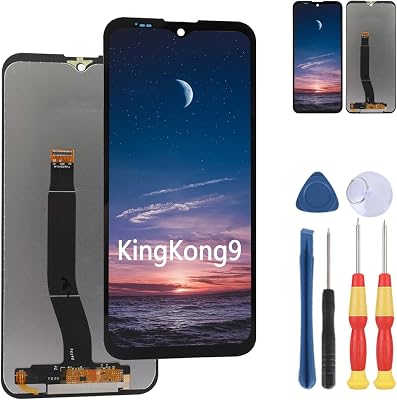
شاشة عرض جديدة تعمل باللمس لـ Cubot Kingkong 9 LCD استبدال الأجزاء بالأدوات.
منتج #:
126234044
KWD 14
Price Details
Excluding Shipping & Custom charges ( Shipping and custom charges will be calculated on checkout )
*All items will import from أمريكا
0 ratings
اكتب رأيك
متوفر فى المخزون
 مستورد من متجر USA
كمية:
اطلب الآن واحصل عليه حول الثلاثاء, يوليو 14
معاملة آمنة
تعمل يوباي جاهدة لحماية أمنك وخصوصيتك. يضمن نظام أمان الدفع المتقدم لدينا السرية من خلال تشفير معلوماتك أثناء النقل باستخدام بروتوكولات AES (معايير التشفير المتقدمة) وSSL (طبقة المنافذ الآمنة). تفاصيل الدفع الخاصة بك آمنة بنسبة %100 لأننا لا نشارك تفاصيل الدفع الخاصة بك مع بائعين تابعين لجهات خارجية
أفضل شركائنا اللوجستيين


تخضع جميع الشاشات البديلة لعمليات تفتيش متعددة قبل الشحن للتأكد من أنه يمكن القضاء على مشاكل مثل الشاشات السوداء والخطوط الثابتة والألوان غير المستوية وما إلى ذلك.

شحن
سريع

استرجاع
مجاني*

تغليف أمن

منتجات أصلية %100

PCI DSS Compliance

ISO 27001 Certified


Note: Step Down Voltage Transformer required for using electronics products of أمريكا store (110-120). Recommended power converters اشتري الآن.


مايفيد
عرض عالي الجودة
Experience vibrant colors and sharp visuals with the Cubot Kingkong 9's new LCD display, ensuring that every image is crystal clear, enhancing your smartphone experience.
مجموعة الأدوات الكاملة متضمنة
Easily replace your screen with the included tools, making the repair process user-friendly and accessible, saving time and avoiding professional repair costs.
بناء متين
Designed to withstand daily wear and tear, the new display maintains the ruggedness of the Cubot Kingkong 9, ensuring longevity and reliability for adventurers and active users.
تفاصيل المنتج
| وزن العنصر | 0.5 رطل (230 جرام) |
من يجب أن يشتري؟

-
إصلاح هاتف DIY
Ideal for individuals who enjoy repairing their own devices and have experience with smartphone hardware components.
-
المستخدمون المهتمون بالميزانية
مثالي للمستخدمين الذين يتطلعون إلى توفير المال عن طريق استبدال شاشاتهم المكسورة بدلاً من شراء هواتف جديدة.
-
عشاق التكنولوجيا
Benefits tech-savvy users who like upgrading and maintaining their devices to enhance performance and usability.

-
المستخدمون غير الفنيين
Not suitable for those who lack experience or skills in phone repairs and might struggle with the installation.
-
حاملي الضمان
Users whose devices are still under warranty may void it by opening the device for repairs without professional help.
-
الأفراد الصبر
Not recommended for users who do not have the time or patience to carefully and methodically replace their screens.
وصف المنتج
شاشة عرض جديدة تعمل باللمس لـ Cubot Kingkong 9 LCD استبدال الأجزاء بالأدوات.
هل لديك أي استفسار؟ تحدث معنا
أسئلة وأجوبة العملاء
-
سؤال:
ماذا أفعل إذا لم يتم تشغيل الشاشة بعد التثبيت؟
إجابه: If the display does not power on after installation, first ensure that all connections are securely attached. Check the flex cable and connector to see if there are any signs of damage or misalignment. Sometimes, simply reseating the connections can solve the issue. Additionally, using a multimeter to test the power supply can help determine if the problem lies with the device rather than the new screen. -
سؤال:
How do I install the New Display Touch Screen for Cubot Kingkong 9?
إجابه: Installing the new display requires careful handling. Begin by powering off your device and removing the back cover. Use the included tools to detach the old screen by carefully prying it away from the frame. Clean the adhesive residue before attaching the new screen. Connect the display to the motherboard, ensuring a snug fit. Finally, test the screen before sealing the device to avoid additional labor. -
سؤال:
Is the New Display Touch Screen for Cubot Kingkong 9 OEM or after-market?
إجابه: The New Display Touch Screen for Cubot Kingkong 9 is typically an after-market replacement part. While OEM parts may offer a slight edge in terms of guaranteed compatibility, high-quality after-market components are designed to meet or exceed the original specifications. They function well in real-world applications, often at a more competitive price point, making them a popular choice for repairs. -
سؤال:
What tools are included with the New Display Touch Screen for Cubot Kingkong 9?
إجابه: This product typically includes essential tools such as a Phillips screwdriver, a plastic spudger, and adhesive strips. These tools are designed to assist in the removal of the old display and the installation of the new one safely and efficiently. Using the right tools can make the process smoother and help avoid damage to your device during the repair. -
سؤال:
Can this display replacement fix touchscreen responsiveness issues?
إجابه: Yes, replacing the display can resolve touchscreen responsiveness issues, especially if the original screen has physical damage or is malfunctioning. Issues like unresponsive areas, ghost touches, or delays can often be traced back to a faulty display. By installing the new display assembly, you restore the device's functionality, ensuring a smooth user experience. -
سؤال:
ما هي الاحتياطات التي يجب أن أتخذها قبل استبدال الشاشة؟
إجابه: Before attempting to replace the screen, ensure you work in a static-free environment. Discharge any static electricity safely by grounding yourself. It's advisable to have a clean, well-lit workspace, and keep all screws and small parts organized. This reduces the risk of losing components during the repair process and prevents accidental damage to internal parts. -
سؤال:
هل سيؤدي استبدال الشاشة إلى إبطال ضمان جهازي؟
إجابه: Yes, replacing the display on your Cubot Kingkong 9 may void the manufacturer's warranty. Most warranties become invalid when unauthorized repairs are conducted, as this is viewed as tampering with the device. If you plan on keeping the warranty intact, consider seeking professional repair services or consulting with the manufacturer prior to making any modifications. -
سؤال:
How do I test if the new display works before sealing the device?
إجابه: To test the new display, connect it to your device's motherboard without sealing it up. Power on the device and check for functionality, such as touch responsiveness, color accuracy, and brightness. This step is crucial as it allows you to identify any potential issues before permanently securing the display, saving you time and frustration. -
سؤال:
What is the return policy for the New Display Touch Screen for Cubot Kingkong 9?
إجابه: Typically, item return policies depend on the retailer you purchase from. It's advisable to check the specific return policy associated with the merchant. Generally, if the product is unopened, you might be able to return it without an issue. For defective parts, it's best to contact customer support for guidance on how to proceed with your return. -
سؤال:
Where can I buy New Display Touch Screen for Cubot Kingkong 9 LCD Display Replace Parts with Tools?
إجابه: You can purchase the New Display Touch Screen for Cubot Kingkong 9 LCD Display directly through Ubuy in Kuwait. Ubuy is a reliable online platform that offers a wide range of replacement parts, including the specific touch screen you need, along with the necessary tools for installation.
MinTroSD Screens مراجعة تحريرية
لم يتم العثور على مراجعات تحريرية
مراجعات العملاء وتقييماتهم
1 تقييمات العملاء
-
5 نجمة
100%
-
4 نجمة
0%
-
3 نجمة
0%
-
2 نجمة
0%
-
1 نجمة
0%
أضف تقييم لهذا المنتج
شارك أفكارك مع عملاء آخرين
إيجابيات
- عرض عالي الجودة
- سهل التثبيت باستخدام الأدوات
- حساسية اللمس ممتازة
- شاشة متجاوبة للغاية
- دقة ألوان رائعة
سلبيات
- قد يتطلب التثبيت الصبر.
تاريخ سعر المنتج
معلومات مهمة
- القيود: بالنسبة للمنتجات التي يتم شحنها دولياً، يُرجى ملاحظة أن أي ضمان من الشركة المصنعة قد لا يكون صالحاً؛ قد لا تتوفر خيارات خدمة الشركة المصنعة؛ قد لا تكون أدلة المنتج والتعليمات وتحذيرات السلامة مكتوبة بلغة بلد المقصد؛ قد لا يتم تصميم المنتجات (والمواد المصاحبة لها) وفقاً لمعايير بلد الوجهة والمواصفات ومتطلبات الملصقات؛ وقد لا تتوافق المنتجات مع الجهد الكهربي المستخدم في بلد الوجهة والمعايير الكهربائية الأخرى (تتطلب استخدام محوّل كهربي أو جهاز تحويل إذا كان ذلك مناسباً). المستلم مسؤول عن ضمان إمكانية استيراد المنتج بشكل قانوني إلى بلد الوجهة. عند الطلب من يوباي أو الشركات التابعة لها، يكون المستلم هو المستورد المسجل ويجب أن يلتزم بجميع القوانين واللوائح الخاصة ببلد الوجهة.
- ليست كل المنتجات المدرجة على يوباي معروضة للبيع، لأن يوباي هو محرك بحث عالمي. المنتجات تخضع للوائح التصدير / التجارة.
KWD 14
اطلب الآن واحصل عليه حول الثلاثاء, يوليو 14
هذا المنتج غير ممنوع في بلدي. (الرجاء الضغط على الرابط أعلاه إذا لم يكن هذا المنتج ممنوعاً في بلدك ، لذلك سيقوم فريقنا بمراجعته والسماح به.)
كمية:
معاملة آمنة
تعمل يوباي جاهدة لحماية أمنك وخصوصيتك. يضمن نظام أمان الدفع المتقدم لدينا السرية من خلال تشفير معلوماتك أثناء النقل باستخدام بروتوكولات AES (معايير التشفير المتقدمة) وSSL (طبقة المنافذ الآمنة). تفاصيل الدفع الخاصة بك آمنة بنسبة %100 لأننا لا نشارك تفاصيل الدفع الخاصة بك مع بائعين تابعين لجهات خارجية
أفضل شركائنا اللوجستيين
أسرع توصيل عبر الحدود
المميزات والفوائد
- Compatible exclusively for Cubot KingKong 9.
- Each screen undergoes rigorous quality inspections.
- يتضمن أدوات ولاصق لسهولة التركيب.
- Video tutorials available for installation assistance.
- Contact support for any model verification or issues.
- Avoid installation mistakes by checking parts before use.