- الصفحة الرئيسية /
- إلكترونيات /
- إكسسوارات الكمبيوتر /
- Computer Accessories & Peripherals /
- Input Devices /
- Graphics Tablets /
- Wacom Intuos Small, Wired Graphic Drawing Tab...




منتج #:
220835228
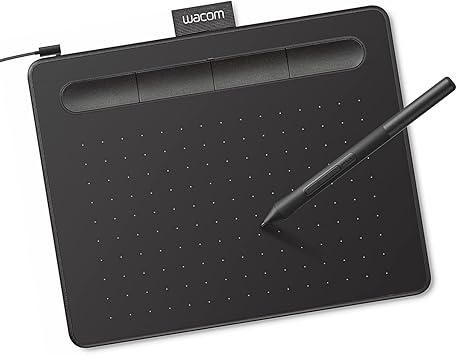
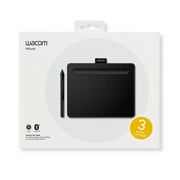
Wacom Intuos Small, Wired Graphic Drawing Tablet with Pen + Software | Battery-free pen, 4 ExpressKeys for shortcuts, works with Mac, Windows &
منتج #:
220835228
KWD 18
تفاصيل السعر
باستثناء رسوم الشحن والجمارك ( سيتم احتساب رسوم الشحن والجمارك عند إتمام الشراء )
*سيتم استيراد جميع العناصر من أمريكا
متوفر فى المخزون
 مستورد من متجر USA
كمية:
اطلب الآن واحصل عليه حول Sunday, اغسطس 30
معاملة آمنة
تعمل يوباي جاهدة لحماية أمنك وخصوصيتك. يضمن نظام أمان الدفع المتقدم لدينا السرية من خلال تشفير معلوماتك أثناء النقل باستخدام بروتوكولات AES (معايير التشفير المتقدمة) وSSL (طبقة المنافذ الآمنة). تفاصيل الدفع الخاصة بك آمنة بنسبة %100 لأننا لا نشارك تفاصيل الدفع الخاصة بك مع بائعين تابعين لجهات خارجية
أفضل شركائنا اللوجستيين


حول العالم من خلال جلب رؤيتك إلى الحياة باستخدام قلم Wacom في يدك.

شحن
سريع

استرجاع
مجاني*

تغليف آمن

منتجات أصلية %100

الامتثال لمعيار PCI DSS

حاصل على شهادة ISO 27001





Note: Step Down Voltage Transformer required for using electronics products of أمريكا store (110-120). Recommended power converters اشتري الآن.


مايفيد
التوافق متعدد الاستخدامات
Works seamlessly across multiple platforms including Chromebook, Mac, Android, and Windows, providing flexibility for artists and designers to use their preferred devices.
مفاتيح Express قابلة للتخصيص
Four programmable ExpressKeys offer personalized shortcuts, enhancing workflow efficiency by allowing users to access their favorite functions instantly while drawing.
Included Training & Software
Comes with comprehensive training resources and software, enabling beginners to quickly master the tablet's features and enhance their artistic skills right out of the box.
تفاصيل المنتج
- Wacom Intuos Small Graphics Drawing Tablet: Enjoy industry leading tablet performance in superior control and precision with Wacom's EMR, battery free technology that feels like pen on paper
- Works With All Software: Wacom Intuos tablet can be used in any software program to explore new facets of digital creativity; draw, paint, edit photos/videos, create designs, and mark up documents
- What the Professionals Use: Wacom's industry leading pen technology and pen to paper feeling makes it the preferred drawing tablet of professional graphic designers
- Software and Training Included: Only Wacom gives you software with every purchase. Register your Intuos tablet and gain access to some of the best creative software and Wacom's online training
- Wacom is the Global Leader in Drawing Tablet and Displays: For over 40 years in pen display and tablet market, you can trust that Wacom to help you bring your vision, ideas and creativity to life
| العلامة التجارية | Wacom |
| اسم الموديل | إنتوس الصغيرة |
| وسائط مدمجة | Wacom Intuos Small Tablet, Wacom Pen 4k, USB-A cable with L-shaped Connector, 3 extra standard nibs and nb removal tool, Quick start guide, regulation sheet |
| الجمهور المستهدف | مدرس |
| رقم الموديل | CTL4100 |
| رقم تعريف التجارة العالمية | 00753218986887 |
| الصانع | شركة واكوم للتكنولوجيا |
| UPC | 753218986887 |
| عدد الوحدات | 1 العد |
| شهادة الاختبار الخارجي | ناو أبليكافيل |
| اسم نوع العنصر | Wacom Intuos Small, Without Bluetooth, black |
| رقم جزء Mfr | CTL4100 |
| تكنولوجيا الاتصال | USB-A |
| حساسية الضغط | 4096 مستويات |
| نظام التشغيل | يعمل مع أنظمة التشغيل Windows وMac OS وAndroid |
| ميزات إضافية | التوصيل والتشغيل باستخدام Chromebook |
| استخدامات محددة للمنتج | Designing, Digital Art, Photo Editing |
| الأجهزة المتوافقة | Windows 7, 8.1 or 10 (excluding Windows 10 S; latest service pack/build), macOS 10.11 or later (latest update) |
| نوع العرض | أخرى |
| حجم الشاشة | 7 بوصات (17.8 سم) |
| وزن العنصر | 8.1 أونصات (229.64 جرام) |
| أبعاد البند L x W | 6.3 "L x 7.87" W (16 سم) |
| منطقة السطح النشطة | 6 "× 3.7" |
| اللون | أسود |
| مدة توفر قطع الغيار في الاتحاد الأوروبي | 7 سنوات |
| ميزة خاصة | التوصيل والتشغيل باستخدام Chromebook |
بضائع خطيرة
لتجنب التأخير في عملية التخليص الجمركي للبضائع الخطرة، يجب فتح الشحنة في مرفق المستودع الخاص بنا للتحقق من مستوى المكونات الخطرة. يرجى الاطلاع على قائمة Dangerous goods here.
ما بداخل الصندوق
Wacom Intuos Small Tablet, Wacom Pen 4k, USB-A cable with L-shaped Connector, 3 extra standard nibs and nb removal tool, Quick start guide, regulation sheet
من يجب أن يشتري؟

-
فنانون مبتدئين
Ideal for novice artists looking to start digital art without overwhelming features or complicated setups.
-
الطلاب والمعلمين
Great for students and teachers needing a versatile tool for assignments, presentations, or digital teaching resources.
-
المبدعين المحمول
Perfect for on-the-go creatives needing a compact, lightweight drawing solution compatible with multiple devices.

-
الرسامين المحترفين
May lack advanced features preferred by professional artists for intricate designs and robust performance needs.
وصف المنتج
هل لديك أي استفسار؟ تحدث معنا
عمليات البحث ذات الصلة
أسئلة العملاء & الإجابات
-
سؤال:
What are the main features of the Wacom Intuos Small Graphics Drawing Tablet?
إجابه: The Wacom Intuos Small Graphics Drawing Tablet boasts several impressive features, including a pressure-sensitive pen that offers 4096 levels of sensitivity, which allows for precise drawing and shading. It also includes four customizable ExpressKeys, enabling users to access frequently used functions quickly. Compatible with Chromebook, Mac, and Android devices, this tablet is versatile for artists of all skill levels. Ideal for digital artists, graphic designers, and hobbyists, the Intuos enhances creativity and workflow. -
سؤال:
How do the customizable ExpressKeys enhance the user experience?
إجابه: The four customizable ExpressKeys on the Wacom Intuos Small Graphics Drawing Tablet significantly enhance user experience by providing quick access to commonly used shortcuts. Users can program these keys to perform functions such as undo, redo, or switch tools, streamlining the creative process. This is particularly beneficial during time-sensitive projects or complex illustrations where efficiency is paramount. As a result, artists can maintain their creative flow without interruptions. -
سؤال:
Is the Wacom Intuos compatible with my device?
إجابه: Yes, the Wacom Intuos Small Graphics Drawing Tablet is compatible with a broad range of devices, including Chromebook, Mac, and Android systems. This multi-device compatibility makes it a versatile tool for digital artists, allowing them to use it with various applications. Whether drawing on a Chromebook during a lecture or using it with a Mac for a professional project, this tablet adapts to your workflow effortlessly, making it suitable for students, professionals, and casual creators alike. -
سؤال:
What software is included with the Wacom Intuos tablet?
إجابه: The Wacom Intuos Small Graphics Drawing Tablet comes with a selection of creative software to kickstart your artistic journey. This includes training resources and applications like Corel Painter Essentials and Clip Studio Paint, which cater to various artistic styles and preferences. The included software not only aids in improving skills but also provides users with tools to explore digital painting, illustration, and photo editing. These resources are perfect for beginners who are looking to learn and enhance their artistry. -
سؤال:
Can I use the Wacom Intuos tablet for photo editing?
إجابه: Absolutely! The Wacom Intuos Small Graphics Drawing Tablet is an excellent choice for photo editing. Its pressure-sensitive pen allows for fine control, enabling precise adjustments and retouching. Users can easily create masks, blend colors, and apply detailed edits, making it a favored tool among photographers and graphic designers. The intuitive interface and customizable options make it compatible with popular photo editing software, enhancing overall productivity in any editing workflow. -
سؤال:
How does the pen technology work on the Wacom Intuos tablet?
إجابه: The pen technology used in the Wacom Intuos Small Graphics Drawing Tablet is based on electromagnetic resonance, which detects the pen's pressure and tilt as you draw. This allows for a highly responsive experience, where the tablet captures every nuance of your art, from fine lines to smooth shading. This technology provides an authentic drawing experience comparable to traditional media, making it suitable for artists transitioning to digital art and enhancing their creative capabilities. -
سؤال:
What type of artists benefit most from the Wacom Intuos tablet?
إجابه: The Wacom Intuos Small Graphics Drawing Tablet is versatile, benefiting a wide range of artists. Beginners will find the included software and training valuable for developing their skills, while intermediate and advanced artists can utilize its pressure sensitivity and customization options to explore intricate designs. Illustrators, graphic designers, and hobbyists alike will appreciate its performance and adaptability across various artistic applications. Whether creating digital drawings, illustrations, or graphic art, this tablet supports diverse creative endeavors. -
سؤال:
Can I use the Wacom Intuos tablet for online tutoring or collaboration?
إجابه: Yes, the Wacom Intuos Small Graphics Drawing Tablet is an ideal tool for online tutoring or collaborative projects. Its precise drawing capabilities allow tutors to illustrate concepts live, while students can create and share their work seamlessly. This interactivity enhances remote learning experiences, making it easier for both instructors and learners to communicate ideas visually. It is especially useful for art classes, design critiques, and feedback sessions, where clarity and precision are essential. -
سؤال:
What is the setup process for the Wacom Intuos tablet?
إجابه: Setting up the Wacom Intuos Small Graphics Drawing Tablet is straightforward. First, download the necessary drivers from the Wacom website based on your operating system. Once installed, connect the tablet to your device via USB, and you're ready to go! The included software often guides you through initial setups and offers helpful tutorials. This process ensures that users of all experience levels can start creating quickly, making it an accessible option for aspiring artists. -
سؤال:
Where can I buy Wacom Intuos Small Graphics Drawing Tablet?
إجابه: You can conveniently purchase the Wacom Intuos Small Graphics Drawing Tablet at Ubuy. Ubuy offers a user-friendly shopping experience with a wide selection of tech products, including graphic tablets. Whether you're a student, professional artist, or hobbyist, Ubuy provides access to this versatile drawing tablet along with additional resources to help you on your creative journey.
Wacom Graphics Tablets Editorial Review


The Wacom Intuos Small Graphics Drawing Tablet garners a generally positive reception among users, particularly those in educational settings and casual artwork. Many users appreciate the high-quality build and performance, noting that it effectively enhances their study and tutoring experience. Students have found it especially useful for note-taking, as it allows for a seamless digital writing experience without the need for bulky devices like iPads. The tablet's responsiveness and comfort are highlighted as major positives; however, some users have reported that using it via Bluetooth can lead to decreased responsiveness and some jagged lines, which may be bothersome for those who require finer precision. In contrast, when connected via cable, users have found it to perform smoothly and reliably. The customizable ExpressKeys are also a benefit, offering flexibility for personal workflows. While users find the tablet easy to use, a few have noted that extended use can lead to discomfort, specifically pointing out that after long writing sessions, the stylus can leave marks on fingers. Additionally, initial adaptation may be required due to the hand-eye coordination involved in using the tablet, as users may need time to adjust to writing without directly looking at their hand. An aspect that has drawn criticism is the Bluetooth functionality; some users experienced difficulties in switching connections between devices, which they found cumbersome. Despite these issues, most users felt that the tablet's strengths outweighed its weaknesses, and they would recommend it to others, particularly students or casual users. **
مراجعات العملاء وتقييماتهم
23848 تقييمات العملاء
-
5 نجمة
76%
-
4 نجمة
14%
-
3 نجمة
5%
-
2 نجمة
2%
-
1 نجمة
3%
أضف تقييم لهذا المنتج
شارك أفكارك مع عملاء آخرين
إيجابيات
- High-quality performance for note-taking and casual drawing
- Comfortable to use with a smooth writing experience when wired
- Customizable ExpressKeys enhance workflow efficiency
- Ideal for educational purposes
سلبيات
- Extended use may cause discomfort in fingers
منصة موثوقة وثقة كاملة للمشتري

A
Ahmad
مشتري موثّق
“Fast delivery, great experience overall.”
03-Jul-26 · عبر Trustpilot
AM
abbas
مشتري موثّق
“Excellent item received as expected and before the estimated time. Thanks for the great service.”
19-Jul-26 · عبر Trustpilot
WA
Waleed
مشتري موثّق
“Thank you for your message. I received the product and it is very good ? I?m really impressed with how great it works! I will be happy to share my feedback on the website.”
11 February 2026 · عبر Trustpilot
AA
Ahmed
مشتري موثّق
“Very good the same exact product that i wanted good shipping and delivery”
10 June 2026 · عبر Trustpilot
AN
Ambhita
مشتري موثّق
“Package delivered on time”
10 July 2026 · عبر Trustpilot
الخروج الآمن
شحن عالمي
إسترجاع سهل
منتجات أصلية
Top selling Wacom Intuos Tablet in الكويت





Last Updated on August 4, 2026
تاريخ سعر المنتج
معلومات مهمة
- القيود: بالنسبة للمنتجات التي يتم شحنها دولياً، يُرجى ملاحظة أن أي ضمان من الشركة المصنعة قد لا يكون صالحاً؛ قد لا تتوفر خيارات خدمة الشركة المصنعة؛ قد لا تكون أدلة المنتج والتعليمات وتحذيرات السلامة مكتوبة بلغة بلد المقصد؛ قد لا يتم تصميم المنتجات (والمواد المصاحبة لها) وفقاً لمعايير بلد الوجهة والمواصفات ومتطلبات الملصقات؛ وقد لا تتوافق المنتجات مع الجهد الكهربي المستخدم في بلد الوجهة والمعايير الكهربائية الأخرى (تتطلب استخدام محوّل كهربي أو جهاز تحويل إذا كان ذلك مناسباً). المستلم مسؤول عن ضمان إمكانية استيراد المنتج بشكل قانوني إلى بلد الوجهة. عند الطلب من يوباي أو الشركات التابعة لها، يكون المستلم هو المستورد المسجل ويجب أن يلتزم بجميع القوانين واللوائح الخاصة ببلد الوجهة.
- ليست كل المنتجات المدرجة على يوباي معروضة للبيع، لأن يوباي هو محرك بحث عالمي. المنتجات تخضع للوائح التصدير / التجارة.
KWD 18
اطلب الآن واحصل عليه حول Sunday, اغسطس 30
هذا المنتج غير ممنوع في بلدي. (الرجاء الضغط على الرابط أعلاه إذا لم يكن هذا المنتج ممنوعاً في بلدك ، لذلك سيقوم فريقنا بمراجعته والسماح به.)
كمية:
معاملة آمنة
نوفر لك مدفوعات مشفّرة، وحماية متكاملة للمشتري، مع الالتزام بمعايير PCI DSS وشهادة ISO 27001:2022 لضمان أعلى مستويات الأمان في كل عملية شراء.
أفضل شركائنا اللوجستيين
أسرع توصيل عبر الحدود
المميزات والفوائد
- مثالي للمبتدئين في الرسم والتلوين وتحرير الصور.
- متوافق مع أجهزة Mac والكمبيوتر الشخصي وChromebook وتحديد أجهزة Android.
- يتضمن برامج مفيدة ودروسًا تعليمية عبر الإنترنت للتوجيه الإبداعي.
- مثالية للأماكن التعليمية لتعزيز التعلم والمرونة.
- يتميز بتصميم مدمج، مما يجعله محمولاً وموفرًا للمساحة.
- مفاتيح ExpressKeys قابلة للتخصيص لسير العمل المخصص.
ضمان Ubuy
تسوّق بثقة مع منتجات أصلية %100، ومدفوعات آمنة متوافقة مع معيار PCI DSS، وحماية بيانات معتمدة وفق ISO 27001، وشحن دولي سريع، وإرجاع مجاني*، وتغليف آمن لكل طلب.